
Ask questions beside your document, organize references, and review proposed changes before saving. Desktop supports your own API service, Codex CLI, or Claude CLI without a Tano account.
Connect a model
Open a document, select Tano assistant in the toolbar, then open model connections.
| Connection | What you need | Setup in Tano |
|---|---|---|
| API | A service URL, model access, and any required key | Enter the base URL and choose Responses or Chat Completions |
| Codex CLI | A locally installed and signed-in CLI | Select Codex CLI; the executable path can usually stay empty |
| Claude CLI | A locally installed and signed-in CLI | Select Claude CLI, or provide an absolute path to its native executable |
Do not append /responses or /chat/completions to the API base URL. Select a connection and model in the conversation; enter a model ID manually if the service has no model list. The CLI default model follows CLI settings, and its answer appears when the turn finishes.
API keys stay in the system credential store, outside your workspace. CLI connections use existing sign-in credentials without storing them in Tano. Selected content is sent to your configured provider; that provider controls access and billing.
Choose references and a task
Open the assistant from a document or selection, check the references, then send your request. References prefer the current unsaved draft; a text selection limits the proposed edit range.
By default, the assistant reads only selected documents. Enable workspace search for research across documents, and allow workspace objects to query tasks, owners, and relations. You can open cited sources; changed sources are marked for another check.
Try a specific request:
- “Extract action items from this meeting, checking for existing tasks first.”
- “Rewrite only this selection, preserving its citations and data.”
- “Summarize completed, pending, and overdue work in this folder, with sources.”
Review changes
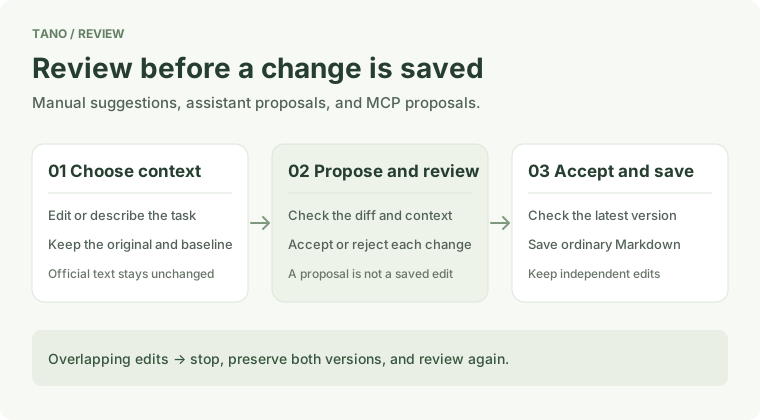
Open the diff and apply the change after checking it. Alternatively, choose the action to review individual changes in the document, publishing them as document suggestions. Once published, the original proposal cannot be applied as a whole, preventing rejected edits from returning.
You can keep writing during generation. Saving compares versions again and merges independent edits; overlapping changes stop the write and preserve the original and proposal. If a result needs verification, inspect it before retrying. New documents, tasks, and relations each require confirmation.
Sessions and availability
Conversations, reference snapshots, and proposals stay in device application data and can be viewed or deleted in session history. They do not travel with .tano/. Stopping generation prevents later calls but does not undo completed writes.
The browser demo generates simulated responses only. Web workspaces have no hosted model endpoint; the official desktop app can reuse desktop model connections in online workspaces. Documents managed by a live collaboration session currently support questions only, not direct application of file edits. The assistant does not automatically run terminal commands, background jobs, or accept proposals.
See MCP integration for external agents and Workspace guidance for shared conventions.