
Use suggestion mode when changes need review before becoming final. Insertions, deletions, and replacements become pending suggestions; the official Markdown stays unchanged until acceptance.
Enter suggestion mode
Open the document’s More (⋯) menu and select suggestion editing. A suggestion-mode label appears above the document; its × exits the mode without discarding pending suggestions.
Type as usual. Added text appears in green, proposed deletions have a strikethrough, and cards show the author and change. Continuous input forms one suggestion; edits in separate locations can be reviewed individually. Both visual and source editing work in this mode. If a complex edit cannot be mapped safely, follow the prompt to use source mode.
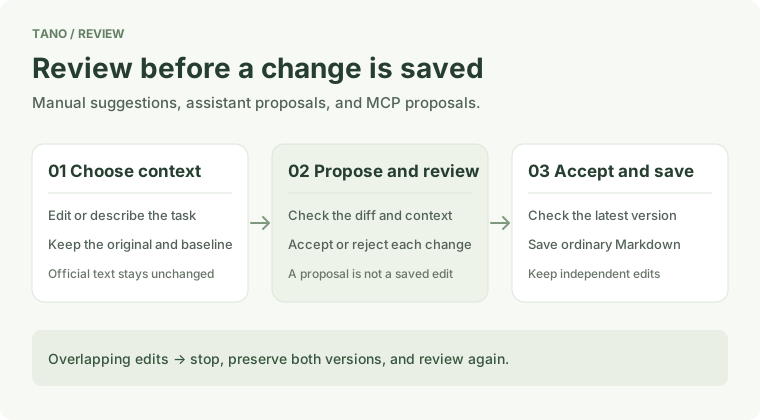
Accept or reject each change
- Select a card to locate the edit and check its context and author.
- Use ✓ to accept that change or × to reject it.
- Check processed suggestions in review history. On narrow screens, cards appear below the document.
Acceptance rereads the draft and stored version, preserving independent edits. If the original changed, the location is ambiguous, or suggestions overlap, reconcile the suggestion before accepting. An old preview is not proof of the current text.
Assistant and MCP proposals
Document edits from the Tano assistant can enter the same workflow through the action to review individual changes in the document. External MCP proposals imported into the assistant can use this too. New documents, events, and relation proposals continue to use assistant review.
Storage and recovery
Suggestions live in .tano/suggestions/<short-file-id>.tano.json, bound to file identity so they survive renaming. Include .tano/ in backups and moves; copying Markdown alone does not copy suggestions.
If someone else changes or reviews the same suggestion, Tano preserves their result. Retry or save a separate local suggestion copy for comparison. If content was written but its receipt was not saved, use the write-result verification action after reopening. Tano will not automatically replay the write.
Current limits
Suggestion mode does not rename files, import new attachments, or persist table widths and cell colors. Existing links and table content can be edited through suggestions. Real-time network suggestion editing is not available; documents controlled by live collaboration cannot use this mode. Demo suggestions stay in the current browser.